


A long arm TV mount gives your screen extra reach and wider viewing angles.
It works well for open layouts, corners, and rooms with different seating spots. These mounts extend, swivel, tilt, and often retract close to the wall.
The right model depends on TV size, weight, VESA pattern, and wall type.
Below, you’ll find seven solid options for flexible viewing in different setups.
| Mount-It! Long Arm Full Motion TV Mount |

| Best For Large Rooms | TV Size: 42-80 inches | Weight Capacity: 110 lbs | VESA Support: 200×200-800x400mm | VIEW LATEST PRICE | Read Our Analysis |
| FORGING MOUNT Heavy Duty Full Motion TV Wall Mount |

| Best Heavy-Duty Pick | TV Size: 55-120 inches | Weight Capacity: 275 lbs | VESA Support: Up to 900×600 | VIEW LATEST PRICE | Read Our Analysis |
| Perlegear Corner TV Wall Mount for 32-75 Inch TVs |

| Best Corner Mount | TV Size: 32-75 inches | Weight Capacity: 100 lbs | VESA Support: 200×100-600x400mm | VIEW LATEST PRICE | Read Our Analysis |
| PERLESMITH Long Arm Full Motion TV Wall Mount |

| Best Premium Pick | TV Size: 42-90 inches | Weight Capacity: 150 lbs | VESA Support: 200×100-800x400mm | VIEW LATEST PRICE | Read Our Analysis |
| ELIVED Long Arm Full Motion TV Wall Mount |
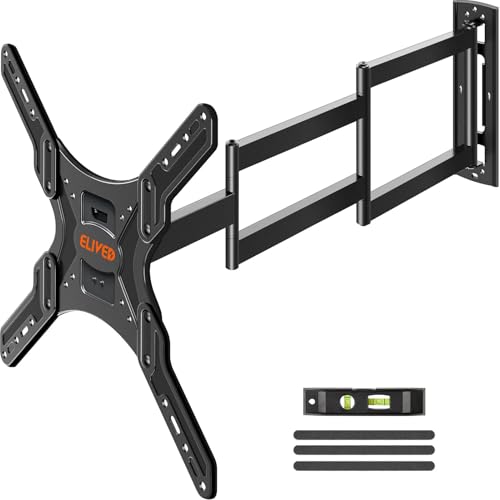
| Best For Small TVs | TV Size: 26-65 inches | Weight Capacity: 77 lbs | VESA Support: Up to 400x400mm | VIEW LATEST PRICE | Read Our Analysis |
| HCMOUNTING Long Arm Full Motion TV Wall Mount |

| Best Easy Install | TV Size: 42-80 inches | Weight Capacity: 110 lbs | VESA Support: 200×200-600x400mm | VIEW LATEST PRICE | Read Our Analysis |
| FORGING MOUNT Long Arm Full Motion TV Mount |

| Best Overall | TV Size: 42-80 inches | Weight Capacity: 110 lbs | VESA Support: 200×100-600x400mm | VIEW LATEST PRICE | Read Our Analysis |
More Details on Our Top Picks
Mount-It! Long Arm Full Motion TV Mount
Should you need a long-reach mount that provides you ample motion without compromising strength, the Mount-It! Long Arm Full Motion TV Mount gives you a reinforced steel bracket with a 40-inch articulating arm. You can place TVs from 42 to 80 inches, up to 110 lbs, with VESA support from 200×200 to 800x400mm. It tilts 15 degrees up and 5 down, and swivels 180 degrees through three pivot points. You’ll also appreciate its cable management, clean black finish, and compatibility with 16-inch or 24-inch studs for corner spots, fireplaces, or TV centers.
- TV Size:42-80 inches
- Weight Capacity:110 lbs
- VESA Support:200×200-800x400mm
- Arm Extension:39.8 inches
- Swivel Range:180°
- Tilt Range:+15°/-5°
- Additional Feature:180° three-pivot swivel
- Additional Feature:Reinforced steel construction
- Additional Feature:Cable management system
FORGING MOUNT Heavy Duty Full Motion TV Wall Mount
Should you be mounting a huge TV in a spacious room, the FORGING MOUNT Heavy Duty XXL Full Motion TV Wall Mount stands out as the best choice for oversized screens, supporting 55- to 120-inch TVs with a long 42.9-inch arm and a 275-pound weight capacity. You can swivel it 180°, tilt it 12° down or 5° up, and fine-tune level through ±3° after installation. Its steel dual-arm build retracts to 2.8 inches, fits wood studs, concrete, or brick, and installs in under 30 minutes. You also get a 10-year warranty and verified safety.
- TV Size:55-120 inches
- Weight Capacity:275 lbs
- VESA Support:Up to 900×600
- Arm Extension:42.9 inches
- Swivel Range:180°
- Tilt Range:+5°/-12°
- Additional Feature:10-year warranty
- Additional Feature:Retracts to 2.8″
- Additional Feature:Preassembled design
Perlegear Corner TV Wall Mount for 32-75 Inch TVs
The Perlegear Corner TV Wall Mount is a strong pick should you need a long arm mount that fits 32- to 75-inch TVs and works especially well in corner setups. You can mount TVs with VESA patterns from 200x100mm to 600x400mm, and it supports up to 100 lbs. It extends 32.37 inches, swivels 90 degrees both ways, and tilts for better viewing. You’ll also get tool-free adjustments and post-install leveling for a clean fit. It works on concrete, brick, or wood studs, and the included hardware makes setup easier.
- TV Size:32-75 inches
- Weight Capacity:100 lbs
- VESA Support:200×100-600x400mm
- Arm Extension:32.37 inches
- Swivel Range:±90°
- Tilt Range:+5°/-15°
- Additional Feature:UL-listed security
- Additional Feature:Solid hinge pin
- Additional Feature:4° post-install leveling
PERLESMITH Long Arm Full Motion TV Wall Mount
PERLESMITH’s Long Arm Full Motion TV Wall Mount is a strong pick should you need serious reach and flexibility in a larger residence, corner setup, or recessed space. You can fit 42- to 90-inch LCD, LED, OLED, 4K, and curved TVs supporting up to 150 lbs. Its 42.72-inch arm lets you swivel 90 degrees, tilt 5° up or 15° down, and level the screen by 4°. It mounts on wood studs, concrete, or brick, then collapses to 4.5 inches for a clean, space-saving look.
- TV Size:42-90 inches
- Weight Capacity:150 lbs
- VESA Support:200×100-800x400mm
- Arm Extension:42.72 inches
- Swivel Range:90° left/right
- Tilt Range:+5°/-15°
- Additional Feature:42.72-inch articulating arm
- Additional Feature:Clips-on cable management
- Additional Feature:4° post-install leveling
ELIVED Long Arm Full Motion TV Wall Mount
Should you need a long-arm mount that can reach across a room or work well in a corner setup, the ELIVED Long Arm Full Motion TV Wall Mount is a strong pick for 26–65 inch TVs. You can extend it 37.4 inches from the wall, then retract it to just 3 inches at the time you want a cleaner profile. It supports up to 77 lbs and VESA patterns to 400x400mm. You get 90° swivel, +5°/-15° tilt, and ±3° leveling. The included kit helps you install it, but you’ll need a stud or concrete wall.
- TV Size:26-65 inches
- Weight Capacity:77 lbs
- VESA Support:Up to 400x400mm
- Arm Extension:37.4 inches
- Swivel Range:90° left/right
- Tilt Range:+5°/-15°
- Additional Feature:Single stud design
- Additional Feature:Bubble level included
- Additional Feature:10.56-pound mount
HCMOUNTING Long Arm Full Motion TV Wall Mount
Should you need a long-arm mount that can swing a large TV far out from the wall, HCMOUNTING’s full-motion model is a strong fit for corner setups and spacious dwelling areas. You can mount 42- to 80-inch TVs carrying up to 110 lbs, with VESA support from 200x200mm to 600x400mm. The arm extends 43 inches, then retracts to just 2.75 inches to save space. You get 90-degree swivel, ±10-degree tilt, and ±3-degree leveling. It installs on 16″-24″ studs or concrete, with hardware, a template, a bubble level, and cable clips.
- TV Size:42-80 inches
- Weight Capacity:110 lbs
- VESA Support:200×200-600x400mm
- Arm Extension:43 inches
- Swivel Range:90° left/right
- Tilt Range:±10°
- Additional Feature:Heavy gauge steel
- Additional Feature:Pre-sorted hardware
- Additional Feature:Bubble level included
FORGING MOUNT Long Arm Full Motion TV Mount
The FORGING MOUNT Long Arm Full Motion TV Mount is the right pick should you need serious reach and flexibility, especially for large TVs in corners or awkward rooms. You can fit 42- to 80-inch flat or curved screens up to 110 lbs, and the 43-inch arm gives you the longest reach in its class. It swivels 360° and tilts +5°/-10°, so you’ll fine-tune your view fast. Its 3mm steel build, locking system, and anti-vibration pads keep things steady. Whenever retracted, it sits just 2.8 inches from the wall.
- TV Size:42-80 inches
- Weight Capacity:110 lbs
- VESA Support:200×100-600x400mm
- Arm Extension:43 inches
- Swivel Range:360° continuous
- Tilt Range:+5°/-10°
- Additional Feature:360° continuous swivel
- Additional Feature:Lifetime warranty
- Additional Feature:Anti-vibration pads
Factors to Consider When Choosing Long Arm TV Mounts
Upon selecting a long arm TV mount, make sure it fits your TV size, weight, and VESA pattern initially. You should also check how far the arm extends, since that affects placement and viewing flexibility. Ultimately, compare the motion and tilt range so you can get the angle you want without straining the mount.
TV Size Compatibility
A good long arm TV mount has to match your TV’s size, weight, and VESA pattern to work safely and properly. You should check that the mount supports your screen’s diagonal size, which often ranges from 32 inches to 120 inches. Next, confirm the VESA pattern on your TV, since mounts only fit specific hole layouts, commonly from 200x100mm to 900x600mm. Should the pattern not line up, the mount won’t install correctly. Also, consider how far the arm extends; longer reach, from about 32 inches to over 43 inches, gives you more placement flexibility and better angles. In case you’re mounting in a corner or awkward spot, choose a model with tilt and swivel so you can aim the screen comfortably.
Weight Capacity Limits
Weight capacity is one of the most vital safety checks while you’re choosing a long arm TV mount, and the mount’s rated limit should always surpass your TV’s actual weight. You should compare your TV’s weight with the mount’s maximum load, which often ranges from 77 to 275 lbs. Many models list limits like 110 or 150 lbs, and you shouldn’t push past them. Even though a mount fits larger screens, it might not handle a heavier set. Add the weight of any soundbar or other accessories to the total, too. Look for reinforced arms and locking mechanisms, because they help support heavier displays and improve stability. As you verify the full load initially, you lower the risk of failure, damage, and unsafe installation.
VESA Pattern Match
After checking the mount’s load limit, make sure the VESA pattern matches your TV’s mounting holes. The VESA pattern is the standardized spacing between those holes, and it’s usually listed in millimeters, like 200x100mm or 400x400mm. Check your TV’s specs before you buy, because the wrong pattern won’t fit. Many long arm TV mounts support a wide range, often from 200x200mm to 800x400mm, so you’ll usually find a compatible option. Matching the pattern correctly helps keep your TV stable and secure on the wall. Don’t assume size alone tells you everything; you need both the VESA pattern and the mount’s weight capacity to work together. Once both match, you’ll get a safer, more dependable installation.
Arm Extension Length
Arm extension length plays a big role in how well your TV fits the room, since longer arms can improve viewing angles and placement flexibility. You’ll usually see mounts ranging from 32 inches to more than 43 inches, so pick a reach that matches your room layout. Should you be mounting in a corner or serving multiple seating spots, an arm beyond 39 inches can give you the extra placement freedom you need. Longer reach also makes it easier to access rear ports and cables without constant unplugging. Check how far the mount retracts, too; many pull back to 2 to 4 inches from the wall. Make sure the extension suits your studs and TV size, so the setup stays stable and doesn’t sag over time.
Motion And Tilt Range
As you’re choosing a long arm TV mount, tilt and swivel matter just as much as reach because they control how comfortably you can see the screen from different seats and cut down on glare. Look for tilt ranges around +5° to -15°, since that lets you angle the screen away from windows and overhead lights. A wide swivel range, sometimes 180° or even 360°, helps you face the TV toward sofas, tables, or corner setups. Should your room be large, an articulating arm with 32 to 43 inches of extension gives you more placement options. After installation, leveling adjustments of about ±3° to ±4° help you fine-tune alignment. Together, tilt and swivel give you flexible, comfortable viewing.
Wall And Stud Support
Wall support is one of the biggest safety checks during the selection of a long arm TV mount, so you’ll want to make certain your wall type can handle it. Most long arm mounts need concrete, brick, or wood stud walls, not drywall alone, to stay secure. Next, check your stud spacing. Many models fit 16-inch or 24-inch centers, and matching that spacing helps you get stable support. You should also verify the mount’s weight capacity, including the TV and the mount itself, so you don’t overload it. Then confirm VESA compatibility to guarantee the bracket aligns with your TV’s mounting pattern. Finally, use any included template or level to position everything correctly and keep the mount anchored firmly to the studs.
Installation Ease
Once you’ve confirmed your wall and stud support, the next thing to look at is how easy the mount is to install. You’ll save time whenever the package includes a clear manual, all needed hardware, and a mounting template. Check that the mount matches your wall type, whether you’re anchoring into wood studs or concrete, and verify stud spacing before you start. Models with a preassembled design can cut setup to under 30 minutes. Tool-free VESA plates help you attach the TV without extra hassle, while built-in leveling adjustments let you fine-tune alignment quickly. Should the mount include cable management, it can also reduce clutter during installation, making the whole process smoother and less stressful for you.
Cable Management Features
Cable management can make a big difference in how polished and practical your long arm TV mount feels. You should look for built-in clips or channels that hide and organize wires, keeping your setup neat. Many mounts let you route cables along the arm or wall, so loose cords won’t snag or distract as you extend or swivel the TV. Some models also include integrated systems that keep ports easy to reach, so you won’t need to disassemble anything for access. Good cable management doesn’t just improve appearance; it also lowers the chance of cable damage and tangling during adjustments. It can even help the articulating arm move more smoothly through reducing friction and obstruction from stray wires.
Frequently Asked Questions
How Do I Hide Cables With a Long Arm TV Mount?
You can hide cables by routing them through the mount’s arm, using adhesive cable clips, and running them inside a wall sleeve or raceway. Keep slack controlled, and you’ll preserve movement without exposing messy wires.
Can One Long Arm Mount Fit Both Flat and Curved TVS?
Yes, you can use one long arm mount for both, provided it matches your TV’s VESA pattern, weight, and size. You will also want a curved TV compatible bracket, since some flat mounts do not sit flush.
What Tools Are Needed for Installation?
You’ll need a stud finder, drill, socket wrench, level, measuring tape, screwdriver, and the included hardware. You might also want a pencil and helper to hold the mount while you tighten everything.
Do Long Arm Mounts Allow Portrait TV Orientation?
Yes, provided your mount’s swivel neck acts like a dance partner, you can rotate the TV to portrait, but only if the bracket supports it. Check VESA specs, weight limits, and tilt clearance first.
How Often Should I Check Mount Screws for Safety?
You should check your mount screws every three to six months and after any move or adjustment. Tighten anything loose, inspect for wall damage, and do not ignore creaks, wobble, or shifting.
