


Rugged laptops are built for rough work, tough travel, and daily knocks. They keep running in job sites, warehouses, trucks, and field work.
This guide covers six solid picks, from the MUNBYN IRX16 and Panasonic Toughbook 33 to Dell’s rugged Latitude lineup. I’ll point out what makes each one stand out so you can choose the right fit.
| MUNBYN Rugged Laptop IRX16 Windows 11 Pro |

| Best Overall | Operating System: Windows 11 Pro | Processor: Intel Core i5-1235U | RAM: 16GB DDR5 | VIEW LATEST PRICE | Read Our Analysis |
| Dell Latitude Rugged 5430 Laptop (2022) Touch |

| Best for Fieldwork | Operating System: Windows 11 Pro | Processor: Intel Core i5-1145G7 vPro | RAM: 32GB DDR4 | VIEW LATEST PRICE | Read Our Analysis |
| Panasonic Toughbook 33 MK1 Rugged 2-in-1 Laptop |
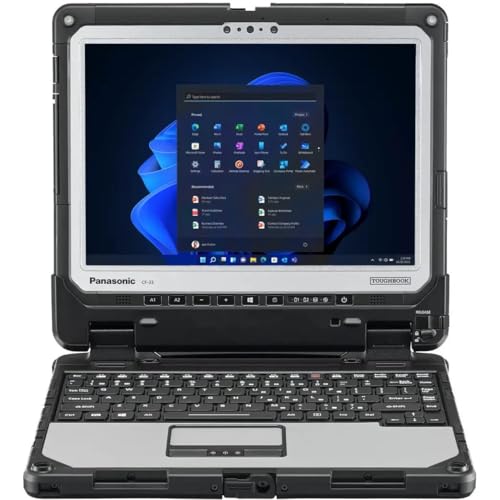
| Best 2-in-1 | Operating System: Windows 11 Pro | Processor: Intel Core i5-7300U | RAM: 16GB DDR4 | VIEW LATEST PRICE | Read Our Analysis |
| Dell Latitude Rugged 5430 Laptop (Renewed) |

| Best Refurbished | Operating System: Windows 11 Pro | Processor: Intel Core i5-1145G7 | RAM: 16GB DDR4 | VIEW LATEST PRICE | Read Our Analysis |
| Dell Latitude 7330 Rugged Extreme Laptop 13.3-Inch |

| Best Premium | Operating System: Windows 11 Pro | Processor: Intel Core i7-1185G7 vPro | RAM: 32GB LPDDR4 | VIEW LATEST PRICE | Read Our Analysis |
| Dell Latitude 5420 Rugged Laptop (Renewed) |
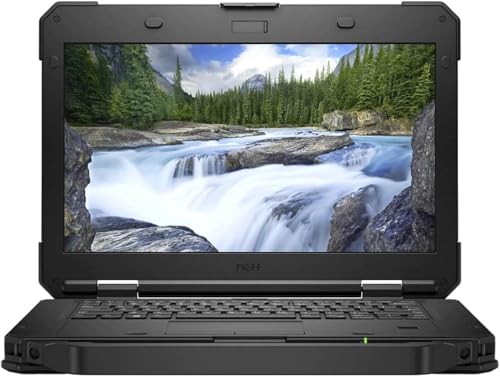
| Best Value | Operating System: Windows 11 Pro | Processor: Intel Core i7-8650U | RAM: 32GB DDR4 | VIEW LATEST PRICE | Read Our Analysis |
More Details on Our Top Picks
MUNBYN Rugged Laptop IRX16 Windows 11 Pro
Should you need a rugged laptop that can keep up with hard work in the field, the MUNBYN Rugged Laptop IRX16 is built for you. You get Windows 11 Pro and an Intel i5-1235U, so you can run AutoCAD, SolidWorks, Siemens NX, ZBrush, and ArcGIS with confidence. Its 16GB DDR5 memory and 512GB replaceable SSD help you move fast, and you can expand storage to 4TB later. Next, its 15.6 inch FHD screen stays clear in sunlight, while Wi-Fi 6 supports smooth remote work. With IP65 protection, MIL-STD-810H strength, and a privacy camera switch, it feels ready for real jobs.
- Operating System:Windows 11 Pro
- Processor:Intel Core i5-1235U
- RAM:16GB DDR5
- Storage:512GB SSD
- Screen Size:15.6-inch
- Rugged Rating:IP65 / MIL-STD-810H
- Additional Feature:1000-nit sunlight screen
- Additional Feature:Wi-Fi 6 connectivity
- Additional Feature:Built-in camera switch
Dell Latitude Rugged 5430 Laptop (2022) Touch
When you need a laptop that can keep working in rough places without slowing you down, the Dell Latitude Rugged 5430 Touch makes a strong case for itself. You get Windows 11 Pro, a 4-core Intel Core i5, and 32 GB of fast DDR4 memory, so your apps stay responsive. Its 14-inch FHD touchscreen reaches 1100 nits, so you can read it outdoors with ease. Then you get 12-hour battery life, Wi-Fi 6E, 5G, Thunderbolt 4, HDMI, Ethernet, and serial ports. It’s MIL-STD-810H verified, IP-53 protected, and ready for hard fieldwork.
- Operating System:Windows 11 Pro
- Processor:Intel Core i5-1145G7 vPro
- RAM:32GB DDR4
- Storage:256GB SSD
- Screen Size:14.0-inch
- Rugged Rating:IP-53 / MIL-STD-810H
- Additional Feature:1100-nit touchscreen
- Additional Feature:5G eSIM support
- Additional Feature:Class 1 Div 2
Panasonic Toughbook 33 MK1 Rugged 2-in-1 Laptop
The Panasonic Toughbook 33 MK1 is a smart fit for you whenever your work takes you beyond a desk and into rough, messy, or fast-moving places. You get a renewed, professionally evaluated 2-in-1 with IP65 sealing, MIL-STD-810G toughness, and 4-foot drop protection. Its 12-inch QHD touchscreen stays bright at 1200 nits, and you can use gloves or a stylus. Inside, the i5-7300U, 16GB RAM, and 512GB SSD keep tasks moving. Plus, Wi-Fi 5, LTE, GPS, and 10 ports help you stay connected.
- Operating System:Windows 11 Pro
- Processor:Intel Core i5-7300U
- RAM:16GB DDR4
- Storage:512GB SSD
- Screen Size:12.0-inch
- Rugged Rating:IP65 / MIL-STD-810G
- Additional Feature:Detachable 2-in-1 design
- Additional Feature:Dual front/rear cameras
- Additional Feature:Dedicated GPS module
Dell Latitude Rugged 5430 Laptop (Renewed)
Built for field teams, repair techs, and anyone who needs a laptop that won’t panic at a little dust or a rough commute, the Dell Latitude Rugged 5430 Laptop (Renewed) brings serious durability in a compact 14-inch form. You get a semi-rugged black chassis, a rigid handle, and sealed port doors that help block grit and splashes. It’s verified for cold, heat, drops, and MIL-STD 810G and H use, so you can trust it on messy days. Inside, the i5, 16GB RAM, and 512GB SSD keep your work moving fast. Its bright FHD screen, handy ports, and Windows 11 Pro make everyday tasks feel easy.
- Operating System:Windows 11 Pro
- Processor:Intel Core i5-1145G7
- RAM:16GB DDR4
- Storage:512GB NVMe SSD
- Screen Size:14.0-inch
- Rugged Rating:IP-53 / MIL-STD 810G&H
- Additional Feature:Semi-rugged chassis
- Additional Feature:100% sRGB display
- Additional Feature:Protective I/O port doors
Dell Latitude 7330 Rugged Extreme Laptop 13.3-Inch
For field crews, emergency responders, and anyone who works where gear takes a beating, the Dell Latitude 7330 Rugged Extreme Laptop 13.3-Inch feels like a steady hand you can count on. Its reinforced body handles shock, heat, and rough weather, so you can keep moving without babying it. Inside, the Core i7 vPro chip, 32GB of RAM, and 512GB SSD keep apps opening fast and multitasking smooth. The 13.3-inch Full HD touchscreen stays readable in bright sun, while Wi-Fi 6E, 4G LTE, Thunderbolt 4, and RJ45 keep you connected.
- Operating System:Windows 11 Pro
- Processor:Intel Core i7-1185G7 vPro
- RAM:32GB LPDDR4
- Storage:512GB NVMe SSD
- Screen Size:13.3-inch
- Rugged Rating:Ruggedized / extreme-duty
- Additional Feature:1400-nit touchscreen
- Additional Feature:IR-FHD facial camera
- Additional Feature:Sealed RGB keyboard
Dell Latitude 5420 Rugged Laptop (Renewed)
Dell’s Latitude 5420 Rugged Laptop (Renewed) is a strong pick in case you need a tough machine that still feels easy to use every day. You get a 14-inch FHD touchscreen, a bright 1000 nit outdoor-readable display, and a sealed backlit keyboard that helps whenever work gets messy. With an i7 chip, 32 GB of RAM, and a 1 TB SSD, it feels quick and roomy. You also get Wi-Fi 5, Bluetooth 4.2, GPS, and 11 ports, so you can plug in almost anything without fuss.
- Operating System:Windows 11 Pro
- Processor:Intel Core i7-8650U
- RAM:32GB DDR4
- Storage:1TB NVMe SSD
- Screen Size:14.0-inch
- Rugged Rating:Rugged business / field-ready
- Additional Feature:Dedicated GPS card
- Additional Feature:1000-nit display
- Additional Feature:Factory rigid handle
Factors to Consider When Choosing Rugged Laptops
As I help you choose a rugged laptop, I start with the durability rating, because it tells us how well the device can handle drops, dust, and rough weather. I also look at screen visibility, performance needs, battery life, and port selection, since the right mix can make your workday much easier. Should you know where and how you’ll use it, I can help you spot the model that fits without paying for extras you won’t use.
Durability Ratings
A rugged laptop only earns its name when its durability ratings back it up, so I always start there before I trust it in the field. I look for IP53, IP65, or better, because those numbers tell me how well it blocks dust and water. Then I check MIL-STD-810G or MIL-STD-810H testing, since that means the laptop faced harsh heat, shock, and vibration. I also compare drop ratings, because a three foot fall and a four foot fall are not the same whenever your gear slips. After that, I review temperature limits, such as -20°F to 145°F, for real work in tough weather. Finally, I like sealed ports, spill resistance, and a reinforced chassis, because small design details often save the day.
Screen Visibility
For screen visibility, I always start with brightness, because a rugged laptop can look tough and still be hard to use as the display washes out in sunlight. I look for 1000 to 1400 nits, since that kind of power helps me read maps, forms, and photos outdoors. Then I check for anti-glare and anti-reflective coatings, because bright shop lights can turn a screen into a mirror. I also want full HD resolution, or 1920 × 1080, since it keeps text sharp without draining the battery too fast. Should I plan to tap, I make sure the touchscreen stays readable with gloves on. Finally, I value wide viewing angles and strong contrast, so the screen still looks clear when I shift positions or share it with someone.
Performance Needs
Strong screen visibility helps me see the work, but the next question is whether the laptop can keep up once the job gets busy. I look for a processor and graphics chip that fit the tasks I run, because CAD, GIS, 3D design, and engineering tools can strain weak systems fast. For everyday field work, I want at least 16 GB of RAM, and I prefer 32 GB or more when I juggle large files or many apps at once. I also choose a fast SSD, ideally 512 GB or larger, since it speeds up booting and file access. Should my workload grow, expandable memory or storage gives me room to breathe. I still want strong speed, but I need it to stay practical and efficient.
Battery Life
Battery life often matters most in a rugged laptop, because I know field work rarely happens near a wall outlet. I look at battery size and real runtime together, since a bigger watt-hour rating usually helps, but screen brightness, processor strain, and wireless use can still drain it faster. For all-day mobility, I want about 10 to 12 hours, so I can keep working through a full shift without stress. I also value hot-swappable or removable batteries, because they let me swap power instead of stopping my day. And whenever I do need a break, fast charging helps me get back to work sooner. That mix gives me confidence whenever the job runs long and the nearest charger feels miles away.
Port Selection
A rugged laptop only helps if I can plug into the gear I actually use, so I always start by checking the port list. I want enough USB-A and USB-C or Thunderbolt ports for daily tools, plus HDMI, Ethernet, audio, and card slots whenever my day gets messy. If I run special equipment, I look for RS-232 serial, VGA, or full-size Ethernet, because some field jobs still live in the past, and that’s fine. I also check for sealed port doors and covered I/O, since dust and water love open gaps. Then I compare microSD, SDXC, Nano-SIM, and M.2 slots. With Thunderbolt 4, USB 3.2, and Wi-Fi 6E or 5G support, I get more flexibility without turning my bag into an adapter zoo.
Connectivity Options
How do I keep a rugged laptop useful whenever the worksite keeps changing? I start with wireless strength. Wi-Fi 6 or 6E helps me move data fast and stay steady in crowded field spaces. If I’m far from a hotspot, I look for 4G LTE or 5G, plus SIM or eSIM support, so I can keep working without hunting for signal bars like a lost hiker. I also check for USB-C, Thunderbolt, USB-A, HDMI, Ethernet, and serial ports, because old gear still shows up on real jobs. Then I want microSD, SDXC, or Nano-SIM slots for quick transfer and mobile access. Finally, Bluetooth matters too, since I like pairing a mouse, keyboard, headset, or printer without extra fuss.
Weight And Size
After I look at connectivity, I also check weight and size, because a rugged laptop that stays online but feels like a brick can slow me down fast. I usually compare the total weight, since rugged models can range from about 3.4 pounds to 6.1 pounds. A lighter tablet-detachable can save my shoulder, while a bigger laptop might feel steadier on a job site. I also watch screen size, because 12-inch and 15.6-inch models carry very differently. Thickness matters too, since slimmer units sit near 0.9 inches, while tougher designs can reach 1.3 inches or more. When a model detaches, I check both pieces. Then I compare closed size and open size, because handles, doors, and reinforced edges can make a bag feel smaller than expected.
Security Features
When I look at security features on a rugged laptop, I want more than a strong shell, because real protection starts with the small details that keep both my device and my data out of the wrong hands. I check for a physical camera switch or privacy shutter, so I can block the webcam whenever I’m not using it. Next, I look for fingerprint readers or infrared cameras, because they let me sign in fast without leaning on one weak password. I also want sealed chassis designs and protected port doors, since they help limit tampering and keep dust and water out. For field work, I like concealed SIM or storage bays, plus lockable parts that I can manage separately.
Frequently Asked Questions
Can Rugged Laptops Survive Saltwater Exposure?
I would not count on it. Saltwater can quickly corrode connectors, ports, and internal components. If it gets exposed, power it off right away, follow any manufacturer cleaning advice before using fresh water, dry it completely, and inspect it carefully.
Are Rugged Laptops Safe for Extreme Desert Temperatures?
Yes, I’d say they can handle desert conditions, but they are not immune to extreme heat. Check the laptop’s temperature limits first, because high temperatures can reduce speed, shorten battery life, and push internal parts toward failure.
Do Rugged Laptops Support Glove-Friendly Touchscreen Input?
Yes, many rugged laptops include touchscreens that work with gloves, especially on models built for field use. Some also support styluses or pressure sensitive input. Check the exact model specifications, since glove response differs by brand and display type.
Can I Replace Rugged Laptop Batteries in the Field?
Yes, I can replace many rugged laptop batteries on site if the model has hot swap support or user removable battery packs. I would check the manual first, keep spare batteries ready, and shut the laptop down safely whenever the design requires it.
Are Rugged Laptops Certified for Aircraft Use?
Usually, I’d say no: rugged laptops are not automatically certified for aircraft use. I would verify FAA or airline approval, EMI test results, and the carrier’s rules. Some models are accepted in flight, while others must be switched off to avoid interference.
Conclusion
Whenever I look at rugged laptops, I consider trust initially. I want a machine that keeps going when the day gets rough, like a backpack in a rainstorm. These six models each bring real strength, useful features, and field-ready comfort. Should you work outside an office, pick the one that fits your hands, your tools, and your pace. The right rugged laptop won’t just survive abuse. It’ll help you stay calm and get things done.
