


ElecGear’s top products are small upgrades that can make gaming gear feel better fast.
The TMR joystick module improves stick control.
A slim heatsink helps keep a PS5 cooler.
The mini 2230 enclosure, WLED kit, and Hall joystick option give you more ways to tune your setup.
| ElecGear TMR Joystick Module Replacement for Victrix Pro BFG |
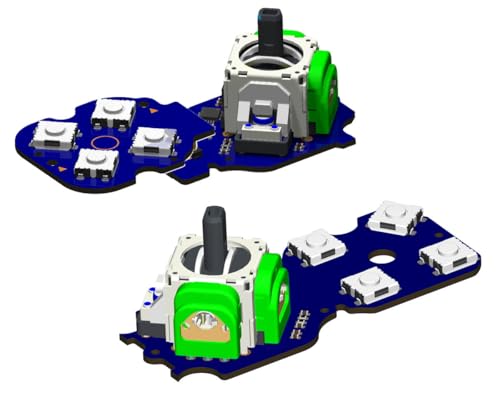
| Best for Controllers | Product Type: Joystick module | Compatibility: Victrix Pro BFG | Connection: USB calibration | VIEW LATEST PRICE | Read Our Analysis |
| ElecGear PS5 SSD Heatsink Ultra for PS5 Pro/Slim |

| Best Cooling Upgrade | Product Type: SSD heatsink | Compatibility: PS5 Pro/Slim | Connection: Internal M.2 | VIEW LATEST PRICE | Read Our Analysis |
| ElecGear Mini 2230 NVMe Enclosure (USB-C 3.2) |

| Best Portable Enclosure | Product Type: NVMe enclosure | Compatibility: 2230 NVMe SSD | Connection: USB-C 3.2 | VIEW LATEST PRICE | Read Our Analysis |
| ElecGear Mini WLED DIY Kit for PS5/PC |

| Best DIY Lighting | Product Type: WLED kit | Compatibility: PS5/PC devices | Connection: WiFi/WLED | VIEW LATEST PRICE | Read Our Analysis |
| ElecGear Hall Joystick Kit for DualSense Edge PS5 |

| Best Drift Fix | Product Type: Hall joystick kit | Compatibility: DualSense Edge | Connection: USB/soldered | VIEW LATEST PRICE | Read Our Analysis |
More Details on Our Top Picks
ElecGear TMR Joystick Module Replacement for Victrix Pro BFG
Should your Victrix Pro BFG drifts or feels loose, this module gives your controller a precise refresh. You can swap in ElecGear’s TMR joystick replacement on both PS and Xbox Victrix Pro BFG models, and it fits as a direct analog module upgrade. Its electromagnetic TMR sensors deliver sharper sensitivity, smoother movement, and a longer life without carbon film wear. You also get upgraded ABXY and D-pad tact switches for faster, lighter input. With onboard self-calibration, PC tuning, and center-point adjustment, you’ll keep control precise. The kit includes both PCB assemblies, rubbers, and tools.
- Product Type:Joystick module
- Compatibility:Victrix Pro BFG
- Connection:USB calibration
- Control Method:Stick/buttons
- Material:TMR/micro switches
- Installation:DIY replacement
- Additional Feature:TMR hall-stick sensors
- Additional Feature:8x tactile switches
- Additional Feature:Independent user calibration
ElecGear PS5 SSD Heatsink Ultra for PS5 Pro/Slim
ElecGear’s EL-P5SP Ultra is a smart cooling upgrade for PS5 Pro and Slim owners. You can fit it to the PS5 Pro CFI-7000 or Slim CFI-2000 internal M.2 NVMe SSD to help keep temperatures under control. Its passive design stays silent while aluminum decks, a copper bridge, nano graphene coating, and a 6.7mm heat pipe move heat into the console’s airflow. It supports many NVMe drives and sizes, but you’ll need to remove any thin stock heatsink. Installation isn’t simple, so make sure you’ve got the skills before you order.
- Product Type:SSD heatsink
- Compatibility:PS5 Pro/Slim
- Connection:Internal M.2
- Control Method:Passive cooling
- Material:Aluminum/copper
- Installation:Advanced install
- Additional Feature:Copper heat pipe
- Additional Feature:Nano graphene coating
- Additional Feature:Silent passive cooling
ElecGear Mini 2230 NVMe Enclosure (USB-C 3.2)
For 2230 NVMe SSD users, ElecGear’s Mini enclosure keeps storage ultra-compact and travel-ready. You get the EL-2230M, a matte gray aluminum case that fits only 30mm M.2 2230 NVMe drives, so it won’t waste space on larger SSDs. Its USB-C 3.2 connection delivers up to 10Gbps, supports UASP and Trim, and includes a USB C2A adapter. You can use it with Windows, Mac, iPhone 15 Pro Max, Steam Deck, Android, and more. At just 25 grams, it’s small, magnetic, and cooled via thermal pads.
- Product Type:NVMe enclosure
- Compatibility:2230 NVMe SSD
- Connection:USB-C 3.2
- Control Method:Data transfer
- Material:Aluminum
- Installation:Simple enclosure
- Additional Feature:10Gbps USB-C 3.2
- Additional Feature:Magnetic cap design
- Additional Feature:Blue LED indicator
ElecGear Mini WLED DIY Kit for PS5/PC
Should you want customizable DIY lighting for your PS5 or PC, ElecGear’s Mini WLED kit stands out. You get an ESP32-based WLED controller in a tiny 40 × 38 × 7.3 mm body, plus two LED ports, a manual button port, and a built-in mic for sound-reactive effects. It works with 5V addressable strips like WS2812B and SK6812, and the free app gives you 150+ effects, 50 palettes, and WiFi syncing. The kit includes two short LED strips, PS5 and PC power cables, and needs some DIY skill.
- Product Type:WLED kit
- Compatibility:PS5/PC devices
- Connection:WiFi/WLED
- Control Method:App control
- Material:ESP32/LED strips
- Installation:Moderate DIY
- Additional Feature:Sound-reactive effects
- Additional Feature:150+ lighting effects
- Additional Feature:50 color palettes
ElecGear Hall Joystick Kit for DualSense Edge PS5
When your DualSense Edge starts drifting, ElecGear’s HL-DSE kit gives you a serious fix. You get two Hall-effect joysticks, two calibration PCBs, and repair tools that help you replace worn thumbsticks with smoother, longer-lasting parts. Hall sensors improve sensitivity and accuracy, while the calibration PCB lets you fine-tune centering and curve trim through a PC web link. That means better FPS aiming and less drift over time. Just remember: this kit fits the DualSense Edge only, needs strong soldering skills, and works best with a 60W-plus iron.
- Product Type:Hall joystick kit
- Compatibility:DualSense Edge
- Connection:USB/soldered
- Control Method:Calibration PCB
- Material:Hall sensors
- Installation:Heavy soldering
- Additional Feature:Hall effect joysticks
- Additional Feature:MCU calibration PCB
- Additional Feature:Center reset trim
Factors to Consider When Choosing Elecgear Top Products
When you choose ElecGear top products, you should first check product compatibility with your device. You’ll also want to weigh performance upgrades, installation difficulty, included accessories, and whether the size and form factor fit your setup.
Product Compatibility
Before you buy any Elecgear product, make sure it matches your exact device family and edition, because compatibility often depends on specific controller versions, console revisions, or SSD form factors. You should check the supported physical format initially, whether that’s a 2230-only NVMe enclosure or a heatsink that fits 2230, 2242, 2260, 2280, and 22110 drives. Then confirm the interface and power needs, such as USB-C 3.2 at 10 Gbps, DC5V LED strips, or controller modules that need a PC USB connection for calibration. You’ll also want to verify edition-specific limits, since some accessories work only with Pro or Slim models, or with one controller variant. Finally, make sure any required changes, like removing a heatsink or soldering, are acceptable to you.
Performance Upgrades
Performance upgrades in Elecgear products usually come down to smarter hardware choices that improve feel, speed, and reliability. You’ll notice the biggest gains upon you move from wear-prone parts to Hall or TMR sensing, which enhances sensitivity, accuracy, smoothness, and lifespan while cutting drift and carbon-film wear. For faster inputs, look for low-travel tactile switches; they give you a shorter stroke, lighter actuation, and steadier feedback than rubber buttons. Should control matters, choose models with solid calibration support so you can fine-tune center points, adjust outer limits, and use self-calibration. For cooling, prefer larger heat spreaders, copper bridges, or heat pipes. For storage, USB 3.2 Type-C, UASP, TRIM, and aluminum housings help keep NVMe speeds stable.
Installation Difficulty
Even the best-performing Elecgear upgrade can be a poor fit provided it’s a hassle to install, so it helps to judge setup difficulty before you buy. You should initially see whether it’s a simple plug-in replacement or a DIY project that needs soldering, disassembly, or trimming. Provided the instructions call for removing stubborn old parts, handling many connector pins, or using a soldering iron above 60W, expect an advanced job. You should also check whether the product needs a PC USB connection for calibration, because setup doesn’t always end once the hardware is in place. Compact parts can still be tricky while they need precise alignment, thermal pad placement, or manual modification. Provided a listing mentions tools, the install is usually more involved.
Included Accessories
Included accessories can make or break an Elecgear kit, so check exactly what’s in the box before you buy. You should verify whether you’re getting only the main unit or also cables, screws, thermal pads, rubber kits, or calibration parts. Extra installation aids like screwdrivers, solder wick, heating plates, or cleaning tubes can save you time and keep you from hunting for separate tools. Should you’re buying an enclosure or adapter, confirm that it includes the right connection pieces, such as USB-C to USB-A adapters or other needed interface parts. For DIY electronics, look for control items like LED strips, buttons, microphones, or preloaded controllers. Compare counts too, because 1x, 2x, or more included parts can change value and setup effort.
Size and Form Factor
Size and form factor matter just as much as specs whenever you’re choosing Elecgear products. You’ll want to measure the space you actually have, because compact accessories might be as small as 40 × 38 × 7.3 mm or 40 × 40 × 9.2 mm, while other kits need room for full controller or console access. Check the size standard first, since some enclosures only accept 2230 modules, and some cooling parts work with 2230, 2242, 2260, 2280, or 22110 formats. Make sure you know whether you’re buying a slot-in replacement, an internal install, or an external add-on. Also watch thickness, not just length and width, and consider weight and housing material if you’ll carry it often.
Calibration Features
After you’ve checked the physical fit, calibration features are the next thing to compare in Elecgear products. You should look for self-calibration or MCU-based circuits, because they can automatically adjust the center point and keep stick accuracy improving over time. Whenever you want tighter control, choose models that let you calibrate the center and outer range yourself so they match your style. A PC USB tool or web-based tester usually gives you more precise tuning than fixed factory settings. This matters even more for joystick replacements, since calibration helps preserve smooth travel, strong sensitivity, and accurate response as parts wear. Whenever you compare input modules, make sure calibration covers both centering and curve trim. Those two features can sharpen fine aiming and directional control.
Frequently Asked Questions
How Do I Know if a Product Fits My Specific Console Model?
Find your console’s exact model number and compare it with the product listing. Check the dimensions, generation, and ports before you buy so the product matches your console correctly.
What Tools Are Needed for Installation?
A precision screwdriver set, tweezers, a plastic prying tool, and sometimes thermal paste or thermal pads are typically required. Review your installation guide first, since your device may also call for a few model specific tools.
Can These Accessories Void My Device Warranty?
Warranty risks depend on the device and how the accessory is installed. You can lose coverage if you modify hardware, break seals, or use parts the manufacturer does not support. Review the warranty policy first, and keep all receipts in a safe place.
Are Firmware Updates Required After Setup?
Usually, firmware updates are not needed after setup, but it is wise to check from time to time. Install an update if it corrects a bug, improves speed, or adds a feature you need. Keeping the device up to date helps maintain reliable performance.
How Long Does Each Product Typically Last?
Typically, each product lasts 3 to 5 years, with 80% of users reporting steady performance over that period. You can help it last longer by using it gently, cleaning it regularly, and installing firmware updates on time.