


Smart hubs tie smart devices together so they work as a single, helpful system. These five options balance wide compatibility, strong privacy features, and straightforward automation.
Each hub has clear strengths and a few trade-offs that matter depending on your setup. Read on to find which one fits your devices and habits best.
| Amazon Echo Hub 8″ Smart Home Control Panel |

| Best for Alexa Homes | Protocol Support: Wi‑Fi, Bluetooth, Zigbee, Matter, Sidewalk, Thread | Voice Assistant Compatibility: Alexa (built‑in) | Local Control / Edge Processing: Built‑in hub with local hub protocols (some local control implied) | VIEW LATEST PRICE | Read Our Analysis |
| Homey Pro (2026) Smart Hub - Z-Wave Zigbee Matter |

| Best for Power Users | Protocol Support: Wi‑Fi, Zigbee, Z‑Wave Plus, Infrared, BLE, Matter, Thread | Voice Assistant Compatibility: Siri, Alexa, Google Home (via integrations) | Local Control / Edge Processing: All protocols processed locally on the device (explicit local processing) | VIEW LATEST PRICE | Read Our Analysis |
| Aeotec Smart Home Hub2 V4 – SmartThings/Matter Gateway |

| Best for Samsung Ecosystems | Protocol Support: Wi‑Fi (Ethernet), Zigbee, Matter (no Z‑Wave) | Voice Assistant Compatibility: Amazon Alexa, Google Assistant | Local Control / Edge Processing: Many local automations operate without internet (SmartThings local support) | VIEW LATEST PRICE | Read Our Analysis |
| Amazon Echo Spot Smart Alarm Clock (Glacier White) |
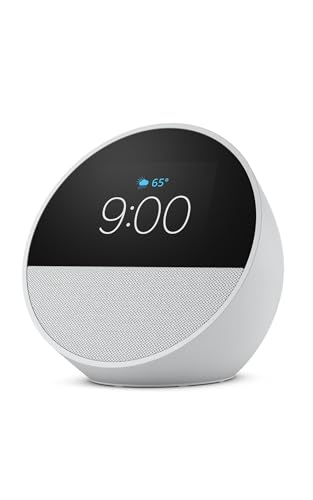
| Best Nightstand Companion | Protocol Support: Wi‑Fi (dual‑band), Bluetooth Low Energy Mesh, Matter (Wi‑Fi only) | Voice Assistant Compatibility: Alexa (built‑in) | Local Control / Edge Processing: Local routines and device control via Alexa (some offline features) | VIEW LATEST PRICE | Read Our Analysis |
| Aqara Smart Home Hub M3 - Matter Thread Zigbee |

| Best for Local Control | Protocol Support: Zigbee, Thread, Matter, Bluetooth, Wi‑Fi, IR (PoE support) | Voice Assistant Compatibility: Alexa, Apple HomeKit (via Matter), SmartThings, Home Assistant | Local Control / Edge Processing: Edge Hub with local control and 8GB encrypted local storage | VIEW LATEST PRICE | Read Our Analysis |
More Details on Our Top Picks
Amazon Echo Hub 8″ Smart Home Control Panel
If you want a touchscreen-first hub that still plays nicely with virtually every smart home standard, the Amazon Echo Hub 8″ is a strong pick- you’ll control thousands of Alexa-compatible devices by touch or voice. It supports WiFi, Bluetooth, Zigbee, Matter, Sidewalk, and Thread through a built-in hub. Customize dashboards, start routines, view camera feeds, and arm compatible security systems, then monitor everything remotely via the Alexa app. Mount it on a wall or use an optional stand; hide cables with in-wall pass-throughs or PoE adapters sold separately. Connect external speakers, use the mic-off button, and appreciate recycled materials.
- Protocol Support:Wi‑Fi, Bluetooth, Zigbee, Matter, Sidewalk, Thread
- Voice Assistant Compatibility:Alexa (built‑in)
- Local Control / Edge Processing:Built‑in hub with local hub protocols (some local control implied)
- Automation / Routines:Alexa routines and customizable dashboard shortcuts
- Smart Home Integration Scale:Supports thousands of Alexa‑compatible devices
- Privacy / Local Storage Options:Multiple privacy controls (mic off); Amazon privacy policies noted
- Additional Feature:8″ touchscreen display
- Additional Feature:Wall-mount or tabletop
- Additional Feature:Connects external speakers
Homey Pro (2026) Smart Hub - Z-Wave Zigbee Matter
Looking for a hub that handles every protocol and keeps your data local? You’ll appreciate the Homey Pro (2026). It supports Z-Wave Plus, Zigbee, Matter, Thread, Wi‑Fi, BLE and Infrared, processing everything locally to protect your privacy. With double the RAM of prior models, it manages larger setups and more simultaneous devices smoothly. Homey’s library covers 50,000+ devices from 1,000+ brands and accepts both official and community apps, with daily additions. Build Flows via the mobile or web app for simple or complex automations, monitor energy use in real time, and optimize consumption based on solar schedules.
- Protocol Support:Wi‑Fi, Zigbee, Z‑Wave Plus, Infrared, BLE, Matter, Thread
- Voice Assistant Compatibility:Siri, Alexa, Google Home (via integrations)
- Local Control / Edge Processing:All protocols processed locally on the device (explicit local processing)
- Automation / Routines:Flows (advanced automations via app or web)
- Smart Home Integration Scale:Supports over 50,000 devices from 1,000+ brands
- Privacy / Local Storage Options:Data processed and stored locally on the hub (minimizes cloud dependency)
- Additional Feature:7 wireless technologies
- Additional Feature:Doubled RAM hardware
- Additional Feature:Community app ecosystem
Aeotec Smart Home Hub2 V4 – SmartThings/Matter Gateway
For homeowners or renters who want a unified, future-ready hub, the Aeotec Smart Home Hub2 V4 delivers SmartThings convenience with Matter and Zigbee support. You’ll get Samsung’s SmartThings platform for reliable monitoring, automation, and compatibility with thousands of devices-lights, sensors, plugs, switches, and thermostats. It supports Matter and Zigbee but not Z-Wave. You can control devices via Alexa or Google Assistant and run voice commands for lights, locks, and routines. Setup uses Wi‑Fi or wired Ethernet, fitting apartments or houses. Create custom routines for security, comfort, and energy savings, and many automations run locally without internet.
- Protocol Support:Wi‑Fi (Ethernet), Zigbee, Matter (no Z‑Wave)
- Voice Assistant Compatibility:Amazon Alexa, Google Assistant
- Local Control / Edge Processing:Many local automations operate without internet (SmartThings local support)
- Automation / Routines:Custom routines with SmartThings automation
- Smart Home Integration Scale:Compatible with thousands of SmartThings devices
- Privacy / Local Storage Options:Local automations function offline (reduces cloud reliance)
- Additional Feature:SmartThings-powered ecosystem
- Additional Feature:Wi‑Fi or Ethernet setup
- Additional Feature:Many local automations
Amazon Echo Spot Smart Alarm Clock (Glacier White)
The Amazon Echo Spot Smart Alarm Clock (Glacier White) is ideal if you want a compact bedside smart display that combines Alexa convenience with rich audio and a customizable clock face. You’ll get a 2.83” touchscreen, 1.73” full-range speaker for clear vocals and deep bass, and multiple clock faces for personalization. It runs Alexa routines for gradual wake-ups, supports dual-band Wi‑Fi, Bluetooth A2DP/AVRCP, Matter over Wi‑Fi, and eero Built‑in for expanded coverage. Built from 36% recycled materials and omitting a camera, it emphasizes privacy with microphone controls and voice-recording management. Includes MT8519 processor, 1GB RAM, 8GB storage, and a 1‑year warranty.
- Protocol Support:Wi‑Fi (dual‑band), Bluetooth Low Energy Mesh, Matter (Wi‑Fi only)
- Voice Assistant Compatibility:Alexa (built‑in)
- Local Control / Edge Processing:Local routines and device control via Alexa (some offline features)
- Automation / Routines:Alexa routines (wake‑up routines, smart device automation)
- Smart Home Integration Scale:Integrates with Alexa ecosystem and compatible smart devices
- Privacy / Local Storage Options:Multiple privacy controls (mic off, voice recording management)
- Additional Feature:2.83″ touchscreen display
- Additional Feature:eero built‑in Wi‑Fi
- Additional Feature:No camera included
Aqara Smart Home Hub M3 - Matter Thread Zigbee
If you want a hub that bridges modern standards like Matter and Thread with wide Zigbee support, the Aqara M3 is a strong pick - it acts as a Thread Border Router, a Matter Bridge for syncing Aqara scenes to Home Assistant and other ecosystems, and supports up to 127 Zigbee and Thread devices (with repeaters for Thread). You’ll get dual-band Wi‑Fi with WPA3, PoE, Bluetooth, IR blaster, USB‑C power-in, and 8GB encrypted local storage. It prioritizes local automations, migrates legacy Zigbee devices, exposes devices to HomeKit via Matter, and integrates with Alexa, SmartThings, IFTTT, and Home Assistant.
- Protocol Support:Zigbee, Thread, Matter, Bluetooth, Wi‑Fi, IR (PoE support)
- Voice Assistant Compatibility:Alexa, Apple HomeKit (via Matter), SmartThings, Home Assistant
- Local Control / Edge Processing:Edge Hub with local control and 8GB encrypted local storage
- Automation / Routines:Local automations, migration of existing Aqara automations
- Smart Home Integration Scale:Supports many Aqara Zigbee/Thread devices and exposes to HomeKit/SmartThings/Home Assistant via Matter
- Privacy / Local Storage Options:No mic/camera; 8GB end‑to‑end encrypted local storage for config and automations
- Additional Feature:360° IR blaster
- Additional Feature:PoE and USB‑C power
- Additional Feature:8GB encrypted local storage
Factors to Consider When Choosing Smart Hub
Before you pick a hub, I look at a few hard requirements: what devices it supports, which protocols it speaks (Zigbee, Z-Wave, Thread, Matter), and whether it works locally or needs the cloud. I also weigh how flexible the automation is and what privacy and security protections are in place. Those factors usually narrow the field fast and help me choose the right option.
Device Compatibility Range
While shopping for a smart hub, I make device compatibility my top checkpoint because it determines which lights, locks, thermostats, sensors, and cameras I can actually control from one place. I look for hubs that support many brands and device types so I’m not locked into one ecosystem. Protocol support matters: Wi‑Fi, Zigbee, Z‑Wave, Thread, Matter, and Bluetooth each widen my options. I prefer hubs that work with multiple voice assistants so I can choose Alexa, Google, or Siri interfaces. Regular firmware updates and active community or third‑party app support mean new devices get added over time. Finally, compatibility with both official and third‑party devices gives flexibility for integrating what I already own and expanding later.
Local Vs Cloud
Because my home network is where most automations run, I pick a hub based on how it handles control locally versus in the cloud. I favor local hubs when I want automations and device control to keep running during internet outages and to limit data leaving my house; processing on-device reduces latency and improves privacy. Cloud-based hubs can be attractive for seamless remote access, frequent feature updates, and broad third-party integrations, but they introduce potential latency and dependence on external servers-if the service is disrupted or discontinued, features can break. So I weigh priorities: choose local-first if you value reliability and data security, or pick cloud-forward if you need wider integrations and convenient remote management.
Supported Protocols
A hub’s supported protocols tell me which devices it’ll actually talk to, so I always check compatibility first. Supported protocols determine the range of devices a hub can connect with-Wi‑Fi, Zigbee, Z‑Wave, Thread, Bluetooth, and the emerging Matter each offer different range, speed, and power profiles. I favor hubs with multi‑protocol radios because they let one unit manage products from various manufacturers and communication technologies. For battery‑powered sensors I prioritize Zigbee or Z‑Wave for their mesh networking and low power draw. I also look for Matter support: it aims to unify ecosystems and simplifies interoperability, reducing the chance my hub becomes obsolete. Bottom line-match protocols to your current devices and likely additions before buying.
Automation Flexibility
Having the right protocols is only part of the story - automation flexibility determines how you actually make devices work together. I look for hubs that let me craft triggers from time, location, or sensors and then tie multiple devices into a single routine. Good hubs support both simple on/off actions and multi-step sequences so my morning scene can run lights, blinds, and thermostats in order. I prefer local processing so automations run fast and reliably even if my internet drops. Visual workflow builders help me design flows quickly, while scripting opens precise control when I need it. Finally, broad device and protocol integration matters: the more compatible hardware a hub supports, the richer my automated possibilities.
Privacy And Security
While I want my smart hub to make life easier, I also expect it to keep my data and devices safe; that means preferring hubs that process automations locally, offer clear privacy controls like mic-off buttons and camera shutters, and store sensitive info with end-to-end encryption. I look for local processing to limit cloud exposure and reduce breach risk. Physical privacy controls let me disable audio or video instantly. Encrypted local storage protects device configs and automation data from unauthorized access. Regular automatic security updates are non-negotiable to patch vulnerabilities as they appear. For maximum privacy, I avoid hubs with always-on microphones or cameras. Prioritize hubs that combine local processing, tangible privacy controls, encryption, and prompt updates.
Installation And Placement
Because placement affects everything from connectivity to usability, I think about installation options and environment before I buy a smart hub. I check whether it can be wall-mounted, sit on a tabletop, or even be ceiling-mounted so it fits my layout and aesthetics. Power matters: I prefer hubs that match nearby outlet locations or support Power-over-Ethernet to hide cables. I place hubs within reliable Wi‑Fi or wired range of my router and central devices to reduce dropouts. If the hub has a display or touchscreen, I position it for easy access and clear visibility. I also avoid direct sunlight, heat sources, and heavy obstructions, since those environmental factors can degrade signal and device longevity.
Frequently Asked Questions
Can These Hubs Manage Multiple User Profiles and Permissions?
Yes. Hubs typically support multiple user profiles and permission levels. Common features include role based access control for administrators and standard users, per-user preferences and personalized settings, temporary guest accounts, and parental controls. Check the hub’s companion app or administration interface to review and configure detailed permission options.
Do Any Hubs Support Local-Only Operation Without Cloud?
Some hubs can run lights locks and sensors entirely on the local network after a power cycle. I run Home Assistant on a dedicated server because it stores data locally and continues automations without relying on any cloud service.
Which Hubs Offer Built-In Battery Backup for Power Outages?
Ring Alarm Pro models, some Hubitat Elevation bundles, and a few newer Aeotec hubs include built-in battery backup. Check each model’s specifications for battery capacity and expected runtime.
Are There Hub Options Compatible With European Voltage and Plugs?
Good news, I found hubs that work with European voltage and plugs. Choose models sold as EU variants or use official EU power adapters. I can help you pick specific options and confirm regional firmware and certifications.
Do Any Hubs Provide Enterprise-Grade Encryption or Audit Logs?
Yes. Some hubs support enterprise-grade encryption and provide audit logging. Look for models that include WPA3 with 802.1X authentication, TLS for device management, and logs formatted for SIEM ingestion. I can help you shortlist specific models and verify their compliance.
Final Thoughts
Picking the right hub comes down to what matters most to you: wide protocol support, local control, privacy, or a smart display for daily tasks. I’d choose the Homey Pro or Aqara M3 if local automations and Matter compatibility are priorities, or the Echo Hub 8” for seamless Alexa control. The Echo Spot is perfect for bedside simplicity. No matter what, your smart home will be smoother than a silk ribbon on a summer night.


