


Smart locks are reshaping how people enter their homes by replacing traditional keys with tech-driven access. Biometric scans, UWB presence detection, and Matter compatibility are turning locks into smarter, more convenient devices.
This article examines seven top smart lock options for 2026 and highlights what each excels at. Practical trade-offs and real-world performance are covered to help pick the right fit for your routine and security needs.
| Philips Smart WiFi Keyless Door Lock with Handle |

| Best For Simplicity | Unlock Methods: Voice (Alexa/Google), physical key, passcode, mobile app | Remote/App Control: Built-in Wi‑Fi - Philips Home Access app for remote control | Battery / Power: 8 AA batteries; up to ~6 months (20–30 uses/day) | VIEW LATEST PRICE | Read Our Analysis |
| Lockly Visage Zeno Smart Lock - Facial & Fingerprint |
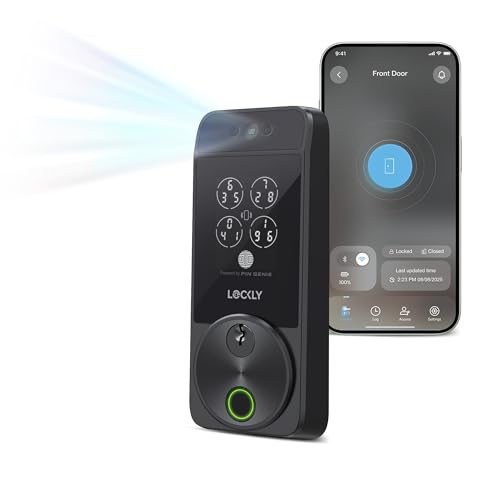
| Best For Biometrics | Unlock Methods: Facial, fingerprint, app, PIN Genie keypad, physical key, Apple Watch tap, voice assistants | Remote/App Control: Built-in Wi‑Fi - Lockly Home app for remote management | Battery / Power: Two 10,000mAh rechargeable batteries; up to ~6 months per charge | VIEW LATEST PRICE | Read Our Analysis |
| TEEHO TE001 Keyless Smart Deadbolt Lock (Matte Black) |

| Budget-Friendly Pick | Unlock Methods: Passcodes (20 codes incl. one-time), keypad (anti-peep), physical key | Remote/App Control: (No native Wi‑Fi noted) - local code entry; app not listed (basic/standalone) | Battery / Power: 4 AA batteries; up to 365 days | VIEW LATEST PRICE | Read Our Analysis |
| Aqara UWB Smart Lock U400 - Fingerprint Keyless Deadbolt |

| Best For Smart Homes | Unlock Methods: UWB hands-free, fingerprint, touchscreen passcode, Apple Home Key (tap), NFC card, physical key, app, voice | Remote/App Control: App remote access via Matter/Thread (Aqara app + ecosystems) | Battery / Power: Rechargeable removable lithium battery; up to ~6 months; USB‑C recharge | VIEW LATEST PRICE | Read Our Analysis |
| Philips Wi‑Fi Smart Keyless Door Lock |

| Best For Remote Access | Unlock Methods: App, passcode, fingerprint, physical key, voice (Alexa/Google) | Remote/App Control: Built-in Wi‑Fi - smartphone app for remote lock/unlock and history | Battery / Power: 4 or 8 AA batteries required; typical battery operation (noted) | VIEW LATEST PRICE | Read Our Analysis |
| Veise RZ07 Fingerprint Smart Deadbolt Lock (Satin Nickel) |

| Best For Rentals | Unlock Methods: Fingerprint, app/web, fobs, code, eKey sharing, mechanical key | Remote/App Control: App and web portal via Bluetooth; remote via Veise G2 Gateway (sold separately) | Battery / Power: Two 10,000mAh? (spec lists rechargeable 10,000mAh for Lockly; for Veise RZ07 it uses internal rechargeable-provides up to 6 months) - marketed rechargeable batteries providing up to ~6 months (depends on usage) | VIEW LATEST PRICE | Read Our Analysis |
| Veise VE017 Fingerprint Smart Door Lock (Matte Black) |

| Professional-Grade Security | Unlock Methods: Fingerprint, app, fob/card, code, mechanical key, voice (with gateway) | Remote/App Control: KK Home App (Bluetooth); remote/Wi‑Fi via Veise G1 Gateway (sold separately) | Battery / Power: 4 AA batteries; ~12 months; USB‑C emergency power port | VIEW LATEST PRICE | Read Our Analysis |
More Details on Our Top Picks
Philips Smart WiFi Keyless Door Lock with Handle
If you want a straightforward, weatherproof smart lock that’s easy to install and manage from anywhere, the Philips Smart WiFi Keyless Door Lock with Handle is a solid pick: You’ll connect it directly to your home WiFi and control access via the Philips Home Access App-remote on/off, permissions, notifications, and event history included. Open with voice (Alexa/Google), key, passcode, or app; physical buttons replace touchscreens for reliability. Set up to 100 passwords with permanent, one-time, or timed modes. It auto-locks, alarms after bad PIN tries, resists weather (IP54), runs on eight AAs for about six months, and installs in 15 minutes.
- Unlock Methods:Voice (Alexa/Google), physical key, passcode, mobile app
- Remote/App Control:Built-in Wi‑Fi - Philips Home Access app for remote control
- Battery / Power:8 AA batteries; up to ~6 months (20–30 uses/day)
- Weather / Durability Rating:IP54 weather-resistant; -31°F to 150°F operational range; 2200N pressure
- Auto-lock / Lock Settings:Auto lock adjustable 10–180 seconds via app
- Installation / Compatibility:Fits US standard deadbolts (1‑1/2″ or 2‑1/8″ crossbore), door thickness 1‑3/8″–2″
- Additional Feature:Physical button interface
- Additional Feature:24-month warranty
- Additional Feature:2200N pressure resistance
Lockly Visage Zeno Smart Lock - Facial & Fingerprint
For anyone who wants seamless, truly keyless entry, the Lockly Visage Zeno is a standout: its fast facial recognition and 3D fingerprint sensor open your door in under a second and let you ditch keys and codes for good. You’ll get dual infrared facial sensors that work in any light, with encrypted on-device storage, plus an AI-enhanced 3D fingerprint reader that recognizes prints in 0.2 seconds and holds up to 99 prints. Built-in Wi‑Fi enables remote control and sharing via the Lockly Home app, Apple Home Key and Siri support, six unlocking methods, DIY install, rechargeable batteries, and a 30‑day return.
- Unlock Methods:Facial, fingerprint, app, PIN Genie keypad, physical key, Apple Watch tap, voice assistants
- Remote/App Control:Built-in Wi‑Fi - Lockly Home app for remote management
- Battery / Power:Two 10,000mAh rechargeable batteries; up to ~6 months per charge
- Weather / Durability Rating:Zinc construction with brushed finish; designed for home use (durable build)
- Auto-lock / Lock Settings:Deadbolt smart lock - auto-lock functionality (configurable via app)
- Installation / Compatibility:Fits doors 1‑3/8″–2″; DIY install in ~15 minutes; right/left swing supported
- Additional Feature:Apple Home Key support
- Additional Feature:Dual IR facial sensors
- Additional Feature:AI 3D fingerprint sensor
TEEHO TE001 Keyless Smart Deadbolt Lock (Matte Black)
The TEEHO TE001 Keyless Smart Deadbolt Lock (Matte Black) is ideal if you want a simple, secure keypad lock that lets you manage up to 20 family codes and temporary one-time PINs for guests. You’ll appreciate anti-peeping code protection and automatic lock options: set auto-lock from 10–99 seconds or trigger one-touch auto-lock by holding any keypad key for two seconds. It runs on four AA batteries (up to 365 days) with a red low-battery indicator under 15%. The aluminum-alloy deadbolt offers IP54 weather resistance and easy screwdriver-only installation for 54mm holes. You get a two-year warranty and lifetime support.
- Unlock Methods:Passcodes (20 codes incl. one-time), keypad (anti-peep), physical key
- Remote/App Control:(No native Wi‑Fi noted) - local code entry; app not listed (basic/standalone)
- Battery / Power:4 AA batteries; up to 365 days
- Weather / Durability Rating:IP54 weather resistance; aluminum alloy construction
- Auto-lock / Lock Settings:Auto lock adjustable 10–99 seconds (off by default); one‑touch auto-lock
- Installation / Compatibility:Compatible with 2‑1/8″ (54mm) door holes; easy screwdriver-only install
- Additional Feature:Anti-peeping protection
- Additional Feature:One-touch auto-lock
- Additional Feature:365-day battery life
Aqara UWB Smart Lock U400 - Fingerprint Keyless Deadbolt
Want a truly hands-free front door that still gives you traditional backup options? You’ll get Ultra-Wideband presence releasing with Thread-enabled Apple hubs and Apple Watch Series 6+/iPhone 11+ (iOS 18.5+), plus fingerprint, touchscreen passcode, NFC card (sold separately), app, voice, and physical key access. Matter over Thread guarantees fast, secure multi-ecosystem support (HomeKit, Alexa, Google, Home Assistant, SmartThings) when paired with a Thread controller. Rechargeable removable battery lasts up to six months, charges via USB-C without downtime, and warns below 20%. BHMA-certified, IP65-rated, rekeyable, and integrates with Aqara cameras and doorbells for video-assisted releasing.
- Unlock Methods:UWB hands-free, fingerprint, touchscreen passcode, Apple Home Key (tap), NFC card, physical key, app, voice
- Remote/App Control:App remote access via Matter/Thread (Aqara app + ecosystems)
- Battery / Power:Rechargeable removable lithium battery; up to ~6 months; USB‑C recharge
- Weather / Durability Rating:IP65 exterior rating; BHMA-certified mechanical strength
- Auto-lock / Lock Settings:Auto Lock configurable in Aqara app (plus Night Latch / Do Not Disturb modes)
- Installation / Compatibility:Includes components; compatible with standard deadbolt installs; rectangular form factor (fits typical doors)
- Additional Feature:UWB true hands-free
- Additional Feature:Matter over Thread
- Additional Feature:BHMA certified
Philips Wi‑Fi Smart Keyless Door Lock
Looking for a smart lock that lets you manage access from anywhere? The Philips Wi‑Fi Smart Keyless Door Lock gives you app, passcode, fingerprint, physical key, and voice entry via Alexa or Google. You can store multiple fingerprints, create up to 100 custom passcodes, and send unlimited one-time or scheduled codes remotely. Built‑in 2.4 GHz Wi‑Fi lets you lock/release and get real‑time notifications and access history-no hub required, peak control within about 65 ft of your router. Auto‑lock (10–180s), Away Mode, easy DIY install, 4 or 8 AA batteries, and US customer support finish the package.
- Unlock Methods:App, passcode, fingerprint, physical key, voice (Alexa/Google)
- Remote/App Control:Built-in Wi‑Fi - smartphone app for remote lock/unlock and history
- Battery / Power:4 or 8 AA batteries required; typical battery operation (noted)
- Weather / Durability Rating:Durable consumer smart lock (no specific IP rating given) - meant for exterior door use
- Auto-lock / Lock Settings:Auto-lock 10–180 seconds configurable via app; Away Mode
- Installation / Compatibility:Fits door thickness 1‑3/8″–2″; easy self-install with screwdriver
- Additional Feature:Away Mode option
- Additional Feature:2.4 GHz only
- Additional Feature:Installation video provided
Veise RZ07 Fingerprint Smart Deadbolt Lock (Satin Nickel)
Who needs ultra-fast, flexible entry? You do if you want the Veise RZ07 Fingerprint Smart Deadbolt (Satin Nickel). It offers 7-in-1 access-fingerprint, app, web portal, fobs, code, eKey sharing, and opens in 0.2 seconds. Designed for US standard doors (1-3/8″–2″ thick, left or right handed), it suits homes, rentals, and offices. Security features include auto-lock, one-touch lock, privacy and passage modes, anti-peeping keypad, and low-battery alerts. Manage 50 fingerprints and 250+ codes, generate temporary or scheduled access via app/web (free lifetime), and add Wi‑Fi and voice control with the Veise G2 Gateway.
- Unlock Methods:Fingerprint, app/web, fobs, code, eKey sharing, mechanical key
- Remote/App Control:App and web portal via Bluetooth; remote via Veise G2 Gateway (sold separately)
- Battery / Power:Two 10,000mAh? (spec lists rechargeable 10,000mAh for Lockly; for Veise RZ07 it uses internal rechargeable-provides up to 6 months) - marketed rechargeable batteries providing up to ~6 months (depends on usage)
- Weather / Durability Rating:Aluminum/metal construction; designed for front-door use (durable finish)
- Auto-lock / Lock Settings:Auto-lock, one-touch lock, privacy & passage modes configurable in app
- Installation / Compatibility:Fits US standard doors 1‑3/8″–2″; easy installation with screwdriver
- Additional Feature:0.2s unlock speed
- Additional Feature:Free web portal
- Additional Feature:Includes IC cards
Veise VE017 Fingerprint Smart Door Lock (Matte Black)
If you prioritize fast, biometric access and robust multi-user controls, the Veise VE017 Fingerprint Smart Door Lock is a strong pick - it verifies fingerprints in under 0.2 seconds with Swedish FPC sensors and a self-learning AI chip, letting you add, share, or revoke access remotely via the KK Home app while keeping detailed encrypted logs for each entry. You get 8-in-1 keyless entry, four password modes (including anti-peeping), auto-lock, and active intrusion defense. The zinc-alloy, IP55-rated lock fits standard doors, installs in about 15 minutes, runs on 4 AA batteries with USB-C backup, and integrates with Veise G1 Gateway.
- Unlock Methods:Fingerprint, app, fob/card, code, mechanical key, voice (with gateway)
- Remote/App Control:KK Home App (Bluetooth); remote/Wi‑Fi via Veise G1 Gateway (sold separately)
- Battery / Power:4 AA batteries; ~12 months; USB‑C emergency power port
- Weather / Durability Rating:IP55 waterproof/dustproof; ANSI/BHMA Grade 3 certified; -35°F to 160°F
- Auto-lock / Lock Settings:Auto-lock adjustable 0–180 seconds via app; Silent/Away modes available
- Installation / Compatibility:Fits standard doors 1‑3/8″–2″, hole diameters 1‑1/2″ or 2‑1/8″; DIY install ~15 minutes
- Additional Feature:Self-learning AI fingerprint
- Additional Feature:USB-C emergency port
- Additional Feature:ANSI/BHMA Grade 3
Factors to Consider When Choosing a Smart Lock
Before you pick one, I’ll run through the key factors that matter: whether the lock fits your door, the releasing methods it offers, battery and power needs, security certifications, and how it connects to your devices. I’ll point out trade-offs like battery life versus features and which ecosystems play nicely together. That way you can match a lock’s strengths to your priorities.
Compatibility With Door
Wondering whether a smart lock will actually fit your door? I always start by measuring door thickness-most locks support 1-3/8″ to 2″ (35–50mm). Next, I check the bore diameter; many models expect 1-1/2″ (38mm) or 2-1/8″ (54mm), and mismatches mean adapters or replacements. Don’t forget handing: confirm the lock works on right-, left-, or universal-swing doors so it operates smoothly. For exterior installs I review weather resistance ratings to guarantee reliability against rain, dust, and temperature swings. Finally, I match the smart lock to the existing hardware-deadbolt, keyed, or keyless-to gauge installation complexity and whether I can DIY or should hire a pro.
Unlocking Options Available
When I pick a smart lock, I look first at how I’ll actually get in: do I want biometric speed, the convenience of a phone app, or the fallback of a physical key? I prioritize methods that fit my daily flow: fingerprint or facial recognition for quick, accurate entry; passcodes with options for permanent, one-time, timed, or temporary codes when I host guests; and a physical key as an emergency backup. I value mobile app control for remote access and granular permission management, plus logging who entered and when. For true hands-free convenience I consider Ultra-Wideband (UWB) systems that detect presence and intent. Finally, I check that biometrics work reliably in varied lighting and note anti-peeping passcode features.
Power And Battery
Because a smart lock runs on batteries, I treat power as a core part of my buying decision: I check the battery type, expected life, and how the lock warns me before it dies. I prefer locks using common AA alkalis for easy replacements, or lithium options when longer life or rechargeability matters. Typical battery life spans months to about a year, so I match that to my usage and maintenance tolerance. I value clear low-battery alerts-app notifications, beeps, or voice prompts-to avoid surprises. Emergency power features like a USB-C port or external battery contact are essential backup plans. Finally, I favor models with efficient power management-auto-lock timers and low-energy wireless-to maximize runtime and reliability.
Security And Certifications
If I’m prioritizing safety, I start by checking certifications and core security features: BHMA Grade 3 or similar ratings tell me a lock can withstand physical attacks and long-term use, while encrypted biometric storage and AES-128 (or stronger) encryption protect credentials and activity logs from remote tampering. I also look for auto-locking, intrusion alarms, and temporary lockouts after repeated failed attempts to deter forced entry and brute-force attacks. Weather resistance (IP54/IP55/IP65) matters too - a durable finish preserves seals and electronics so security features work reliably outdoors. Finally, privacy and access controls like privacy/away modes, multiple password schemes, and anti-peeping codes keep family and guest access private without sacrificing convenience.
Connectivity And Ecosystem
While I prioritize security, I also check how a smart lock connects and what ecosystem it fits into, since connectivity determines remote control, automation, and which devices can interact with your door. I look for built-in Wi‑Fi for direct remote access or Bluetooth for local control; if a lock needs a bridge or gateway, I factor that into cost and latency. Compatibility with HomeKit, Alexa, Google Assistant, or third‑party hubs matters because it enables voice commands and routines. I favor locks supporting Thread and Matter when possible for stable, low‑power, cross‑platform links. Finally, I evaluate which release methods the ecosystem enables-app control, voice access, biometrics, or key cards-so convenience matches my security and smart‑home setup.
Installation And Maintenance
When I pick a smart lock, I start by verifying it physically fits my door - thickness and deadbolt hole size matter for a hassle-free install - and then I look for models designed for DIY setup so I can usually finish the job with a screwdriver in about 15 minutes. I also check the power system: removable batteries or a reachable rechargeable port let me swap or charge without dismantling the unit. Maintenance alerts are key - I want low-battery notifications in the app or audible warnings so I’m not caught out. For exterior doors I prioritize weather-resistant materials and an IP rating that matches my climate to cut down on corrosion and maintenance visits over time.
Privacy And Data Storage
Because smart locks handle the keys to your home and your personal biometrics, I make privacy and data storage a top priority when choosing one. I favor locks that encrypt biometric templates-fingerprints or facial data-and keep them on-device rather than in the cloud, reducing exposure. I also look for local, encrypted access logs so my entry history isn’t an easy target. I verify the app and backend use strong transport and storage encryption (for example AES128 or better) to protect data in transit. Granular access controls matter: I only grant necessary permissions and restrict who can view or manage sensitive data. Finally, I choose locks that let me delete stored biometrics and logs, giving me clear control over retention.
Frequently Asked Questions
Can Smart Locks Be Integrated With HVAC or Energy-Management Systems?
Yes. I integrate smart locks with HVAC and energy management systems by linking locks to presence sensors and automation platforms such as HomeKit, Google Home, and SmartThings so heating and cooling adjust when doors lock or when occupants arrive or leave.
Do Smart Locks Comply With Renters’ Lease Agreements?
Yes. Whether a smart lock is allowed depends on the specific lease terms and your landlord. Review the lease carefully, obtain written permission for any changes, and select a noninvasive or removable smart lock to protect your security deposit and comply with any alteration clauses.
What Are the Privacy Risks of Facial Recognition Locks?
They risk misuse, data breaches, and long term retention of biometric templates. Providers or attackers could access, share, or repurpose your facial data for profiling, tracking, or commercial uses. False matches and covert identification increase the chance of wrongful access and pervasive surveillance, which undermine personal privacy. I recommend caution, requirements for encrypted on-device storage, minimal retention periods, transparent data-use policies, and independent audits.
How Do Smart Locks Perform in Extreme Temperatures or Humidity?
Measure twice, cut once. Smart lock performance differs by model; some handle high heat, freezing cold, and heavy humidity while others fail. Look for specific industrial ratings such as IP for water and dust resistance and the manufacturer’s listed operating temperature range. Check for robust weather seals and batteries rated for extreme temperatures to reduce the risk of malfunctions.
Are Replacement Parts and Servicing Widely Available Long-Term?
Yes. I verify parts availability before purchasing. In my experience many manufacturers maintain spare parts and repair options for several years. I prioritize brands that publish explicit spare-part catalogs, allow third-party locksmith servicing, and provide transparent firmware update schedules.
Final Thoughts
I’ve walked through the top smart locks for 2026 so you can pick what fits your door and life. Think of choosing a lock like planting a tree-you want roots (security), branches (features), and resilience (battery, weatherproofing). Prioritize encryption, reliable releasing methods you’ll actually use, and ecosystem compatibility. Balance convenience with strong physical and digital safeguards so your home stays welcoming to loved ones and locked tight against intruders.


