


The best high-end gaming mouse for 2026 comes down to speed, comfort, and rock-solid precision.
Top picks stand out with sharper sensors, lighter builds, stronger wireless performance, and smarter button placement. Some are built for fast flicks and esports play, while others fit a wider range of games and grip styles.
A quick look at the top options shows which ones truly earn a spot on your desk.
| Logitech G305 Lightspeed Wireless Gaming Mouse White |

| Best Budget Wireless | Sensor: HERO optical sensor | Max DPI: 12,000 DPI | Connectivity: LIGHTSPEED wireless | VIEW LATEST PRICE | Read Our Analysis |
| Logitech G703 Lightspeed Wireless Gaming Mouse Black |
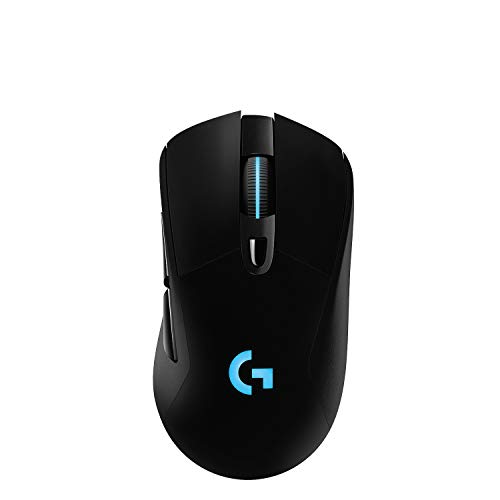
| Ergonomic Performance Pick | Sensor: HERO 25K sensor | Max DPI: 25,600 DPI | Connectivity: LIGHTSPEED wireless | VIEW LATEST PRICE | Read Our Analysis |
| Razer Naga V2 HyperSpeed Wireless MMO Mouse |

| Best for MMOs | Sensor: Focus Pro 30K optical sensor | Max DPI: 30,000 DPI | Connectivity: HyperSpeed wireless + Bluetooth | VIEW LATEST PRICE | Read Our Analysis |
| Razer Viper V3 Pro Wireless Gaming Mouse |

| Pro Esports Pick | Sensor: Focus Pro 35K Optical Sensor Gen-2 | Max DPI: 35,000 DPI | Connectivity: HyperSpeed wireless | VIEW LATEST PRICE | Read Our Analysis |
| Logitech G502 Hero Wired Gaming Mouse |

| Best Wired Option | Sensor: HERO gaming sensor | Max DPI: 25,600 DPI | Connectivity: Wired | VIEW LATEST PRICE | Read Our Analysis |
More Details on Our Top Picks
Logitech G305 Lightspeed Wireless Gaming Mouse White
In case you want a high-end gaming mouse that balances speed, portability, and value, the Logitech G305 Lightspeed Wireless Gaming Mouse White is an easy fit. You get a HERO optical sensor with up to 12,000 DPI, giving you sharp accuracy and efficient performance. LIGHTSPEED wireless tech delivers a 1 ms response time, so your inputs feel instant.
You can game for up to 250 hours on one AA battery, then stash the USB receiver inside the mouse for travel. Its lightweight, classic shape keeps you comfortable, while six programmable buttons and on-board memory let you keep settings ready on PC or Mac.
- Sensor:HERO optical sensor
- Max DPI:12,000 DPI
- Connectivity:LIGHTSPEED wireless
- Battery Life:Up to 250 hours
- Programmable Buttons:6
- Compatibility:PC and Mac
- Additional Feature:On-board memory
- Additional Feature:Lightweight compact design
- Additional Feature:USB receiver storage
Logitech G703 Lightspeed Wireless Gaming Mouse Black
Logitech’s G703 Lightspeed stands out as a high-end pick for PC gamers who want wireless speed without giving up comfort. You get Logitech’s HERO 25K sensor with 1:1 tracking, 400+ IPS, zero smoothing, and a DPI range from 100 to 25,600, so every swipe feels precise and controlled. LIGHTSPEED wireless keeps response fast, while the efficient sensor supports up to 35 hours of play with RGB on.
At 95 grams, with an optional 10-gram weight, it lets you tune the feel. Rubber side grips, six programmable buttons, crisp metal-spring clicks, and POWERPLAY compatibility make it a smart premium choice for long sessions.
- Sensor:HERO 25K sensor
- Max DPI:25,600 DPI
- Connectivity:LIGHTSPEED wireless
- Battery Life:Up to 35 hours
- Programmable Buttons:6
- Compatibility:Windows PC
- Additional Feature:POWERPLAY charging support
- Additional Feature:Rubber side grips
- Additional Feature:LIGHTSYNC RGB lighting
Razer Naga V2 HyperSpeed Wireless MMO Mouse
Need a premium MMO mouse that won’t leave you hunting for keybinds mid-fight? The Razer Naga V2 HyperSpeed gives you 19 programmable buttons, a right-handed ergonomic shape, and a dual-mode HyperScroll wheel, so you can manage rotations, macros, and menus without fumbling. You’ll get a Focus Pro 30K sensor for sharp tracking, even on glass, plus Gen-2 mechanical switches rated for 60 million clicks.
You can run HyperSpeed Wireless for low-latency play or switch to Bluetooth for longer sessions. Expect up to 250 hours on HyperSpeed and 400 on Bluetooth from one AA battery, with Synapse customization, Windows support, and a two-year warranty.
- Sensor:Focus Pro 30K optical sensor
- Max DPI:30,000 DPI
- Connectivity:HyperSpeed wireless + Bluetooth
- Battery Life:Up to 400 hours Bluetooth / 250 hours HyperSpeed
- Programmable Buttons:19
- Compatibility:Windows PC
- Additional Feature:Dual-mode scroll wheel
- Additional Feature:19-button MMO layout
- Additional Feature:Glass surface tracking
Razer Viper V3 Pro Wireless Gaming Mouse
Razer Viper V3 Pro stands out for competitive players who want every advantage from a featherlight 54-gram mouse that moves fast and stays precise under pressure. Its symmetrical shape suits your preferred grip, and pro esports input helped refine the black-bodied design for serious play.
You get a Focus Pro 35K Optical Sensor Gen-2 with 1-DPI adjustments, reliable tracking on many surfaces, even glass, and HyperSpeed Wireless that stays stable in noisy setups. HyperPolling reaches a true 8000 Hz, while Gen-3 optical switches deliver 0.2 ms actuation, 90 million clicks, and no debounce issues. Expect up to 95 hours and deeper tuning in Synapse.
- Sensor:Focus Pro 35K Optical Sensor Gen-2
- Max DPI:35,000 DPI
- Connectivity:HyperSpeed wireless
- Battery Life:Up to 95 hours
- Programmable Buttons:Not specified
- Compatibility:Windows PC via Razer Synapse
- Additional Feature:54g ultra-lightweight
- Additional Feature:8000 Hz polling
- Additional Feature:90-million-click switches
Logitech G502 Hero Wired Gaming Mouse
For players who want a high-end wired mouse with deep customization, the Logitech G502 Hero stands out with its HERO sensor, which tracks with pinpoint precision up to 25,600 DPI and skips smoothing, filtering, and acceleration. You get 11 programmable buttons, a dual-mode hyper-fast scroll wheel, and crisp clicks from Logitech’s mechanical tensioning system.
You can fine-tune feel with up to five 3.6 g weights, letting you adjust balance to match your grip and play style. LIGHTSYNC RGB adds customizable lighting, while onboard memory saves your profiles. Since it works with both PC and Mac, you can plug in and keep your settings ready anywhere.
- Sensor:HERO gaming sensor
- Max DPI:25,600 DPI
- Connectivity:Wired
- Battery Life:Wired, no battery
- Programmable Buttons:11
- Compatibility:PC and Mac
- Additional Feature:Adjustable weight system
- Additional Feature:Hyper-fast scroll wheel
- Additional Feature:LIGHTSYNC RGB lighting
Factors to Consider When Choosing a High End Gaming Mouse
At the moment I choose a high-end gaming mouse, I look initially at sensor accuracy because it directly affects how reliably my aim tracks. I also pay close attention to weight and shape, button customization, and whether a wireless model offers strong battery life without compromise. Finally, I check polling rate and latency, since I want every movement and click to feel fast and consistent for you and me in real play.
Sensor Accuracy
Although shape and weight matter, I always put sensor accuracy near the top of the list because it directly affects how precise and responsive a high-end gaming mouse feels. I look for a sensor that delivers true 1:1 tracking, so cursor movement mirrors my hand exactly without smoothing, filtering, or acceleration getting in the way.
DPI matters too, but not just huge numbers. Many premium mice reach beyond 30,000 DPI, yet I care more about fine adjustment in 1-DPI steps, which lets me tailor sensitivity for different games and situations. I also favor advanced optical sensors because they track reliably on more surfaces, even glass in some cases. Finally, I check IPS and latency. High IPS and low latency help the sensor keep up with fast swipes without jitter, spinouts, or noticeable delay.
Weight And Shape
Because I notice comfort and control immediately, I treat weight and shape as make-or-break factors in a high-end gaming mouse. Weight changes how quickly I can flick, track, and play for hours without fatigue. Ultra-light models, sometimes around 54 grams, feel effortless during long sessions. In case I want more steadiness, adjustable weight systems let me tune the balance to match my grip and pace.
Shape matters just as much. I look for a body that fits my hand size and supports how I naturally hold the mouse, whether palm, claw, or fingertip. Some players need ergonomic right-handed shells, while others do better with symmetrical, ambidextrous designs. Should I travel often, I also appreciate a compact shape that packs easily but still feels comfortable and precise in use.
Button Customization
Button customization can completely change how I play, especially once I match a mouse’s layout to the games I spend the most time in. Some high-end models give me only six programmable buttons, while others push past nineteen, which matters should I want simple controls or deep command mapping.
I look for software that lets me assign commands or macros cleanly, because faster access can sharpen reactions and reduce wasted movement. I also value on-board memory, since it keeps my profiles saved whenever I switch setups. Beyond sheer button count, placement matters just as much. I want side buttons that feel natural, easy to reach, and never force awkward thumb stretches that hurt comfort or accuracy. Finally, responsive switches and tensioned clicks help every input feel crisp, fast, and dependable under pressure.
Wireless And Battery
During the period I choose a high-end gaming mouse, wireless performance and battery life sit near the top of my list because they shape both responsiveness and daily convenience. I look for strong 2.4 GHz or proprietary wireless options that feel as dependable as a wired connection throughout serious play.
I also check battery endurance carefully, since it can range from roughly 35 hours to well over 400 depending on mode and power efficiency. Dual connectivity matters to me because Bluetooth can stretch runtime for work or travel, while the dedicated wireless mode suits gaming. I pay attention to intelligent sleep features and wireless charging support, since both reduce interruptions. Finally, I compare battery types: rechargeable lithium polymer packs feel convenient, but replaceable AA batteries can offer longer runtime and quick swaps as needed.
Polling And Latency
Once I evaluate polling and latency, I focus on how quickly and consistently the mouse sends its movement data to my PC, since that directly affects how responsive it feels in play. Polling rate measures how often the mouse reports its position, expressed in Hertz. In gaming, I usually look for 500 Hz to 1000 Hz, with 1000 Hz providing updates 1000 times per second.
I also pay close attention to latency, because lower numbers mean faster response. For competitive play, I want latency around 1 ms or less. Higher polling rates can reduce input lag and help me track targets more precisely in fast matches. I also value advanced wireless technology that keeps the connection stable, because the best wireless mice can now match, or even beat, wired responsiveness in actual gameplay.
Software And Compatibility
After I’ve checked polling and latency, I look at software and compatibility to make sure the mouse fits how I actually play and the systems I use. I want software that lets me fully customize programmable buttons, DPI steps, macros, and lighting without making simple changes feel complicated or buried in menus.
I also check whether the mouse works smoothly on Windows and Mac, especially in case I switch between devices. On-board memory matters because I can save profiles directly to the mouse and keep my settings even during times the software isn’t installed. That’s useful for tournaments, travel, or shared setups. I also like software that syncs with my keyboard, headset, or other peripherals, since unified lighting and performance settings make my entire gaming setup feel more consistent, responsive, and easier overall.
Frequently Asked Questions
How Long Do High-End Gaming Mouse Switches Typically Last?
Premium gaming mouse switches usually handle about 50 to 100 million clicks, with some optical designs rated even higher. Actual lifespan changes based on how hard you press, how often you play, your grip style, and the overall construction of the mouse.
Are Premium Gaming Mice Worth It for Casual Players?
Premium gaming mice can make sense for casual players if comfort, durability, and accurate tracking matter to you. If keeping costs low is the bigger priority, I would recommend choosing a simpler option instead.
Can a Gaming Mouse Improve Aim Without Changing Settings?
Yes, I think a gaming mouse can sharpen your aim even if you keep every setting the same, since it usually gives you cleaner sensor input, faster click response, and more reliable tracking during quick movements. Practice still matters, but your shots can feel more repeatable and controlled.
Do High-End Gaming Mice Work Well on Glass Desks?
High-end gaming mice can track on glass desks if they use sensors designed for glossy surfaces. Check the sensor specs, test cursor movement for skips or stutter, and keep a mouse pad nearby if tracking feels inconsistent.
How Often Should I Replace Skates on a Gaming Mouse?
I replace my mouse skates every 6 to 12 months, or sooner if the glide turns scratchy, starts feeling uneven, or the edges look worn down. Daily play on a rough mouse pad usually wears them out much faster.


